How to Start Earning with xHamster
Hi there,
Welcome to the xHamster community! We’re excited to help you begin your journey to earning with our platform. Follow this step-by-step guide to set up your account and start monetizing your content:
Step 1: Verify Your Identity
Identity verification is a crucial and highly secure process. Once you complete it, you’ll get access to monetization, video uploads, and other platform features.
The process requires you to submit your identity documents and take a photo of your face.
Step 2: Activate Monetization
- Navigate to Your Dashboard.
- Click the Activate button on the Monetization section.
Enter Required Information
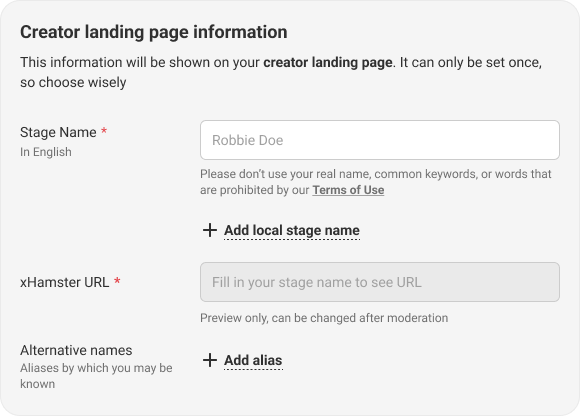
- Stage Name: Enter your preferred stage name. This name will be shown on your landing page. Do not use your real name unless you want it displayed on your landing page.
- Alternative Names: If you have any alternative stage names that your audience might recognize you by, enter them as well.
- Country of your documents: You will see the country of documents listed, along with an option to display this information to your audience or keep it hidden. We recommend showing your country, as this can help attract the most traffic.
- Residential Address: Provide your valid residential address. The address is required for processing withdrawals. Your information will remain strictly confidential and secure.
- Profile Photo: Upload a real photo of yourself, preferably one where your face is clearly visible. Avoid using body parts, cartoons, or AI-generated images. This photo will be shown to all users and displayed on your landing page representing your profile.
- Request Approval: After you’ve entered all the required information, review and accept our User Agreement, then submit your request for approval.
Wait for your request to be reviewed and approved. Moderation usually takes 1-3 days.
Step 3: Protect your Content
- Navigate to Your Dashboard and click on the Content Protection button. Once you are there, create a List of Trusted Websites and Enable Protection.
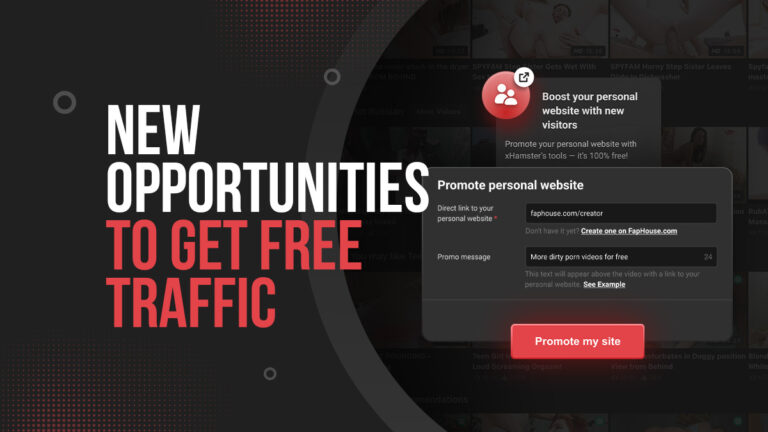
Step 4: Activate Free Traffic
- Navigate to Your Dashboard and Go to Free Traffic form.
To activate the tool, follow these simple steps:
- Insert the link to your personal paysite or premium content.
- Add your promo message. A banner will be created and placed under your videos.
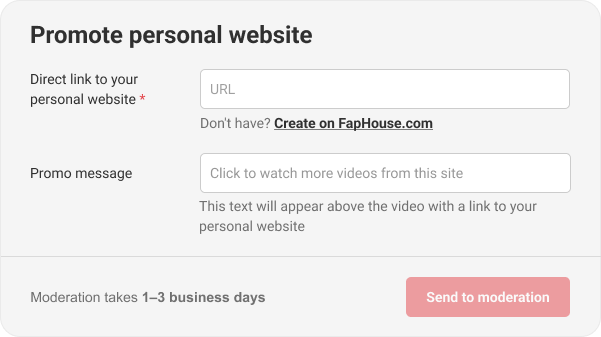
Once you’ve filled out the form, click the Send to Moderation button and wait for approval. After the form is approved, the banner will automatically appear under your videos.

Step 5: Upload Your Videos
Once you have completed the previous steps, you can start uploading your videos and make the most of them!
We can’t wait to see you rocking!
In case of any questions please feel free to reach out to us via Contact Form.
With Love
xHamster Team